Guide for churches
How to make sermon clips for social media
To make sermon clips, take the recording or the finished livestream, mark where the sermon starts and ends, and cut it into short vertical clips that each carry one complete thought: a teaching, a story or an application, with captions. An AI clip maker like iaclips does the cutting for you: it picks moments that stand on their own, up to 3 minutes, crops them to 9:16 and captions them. You review each clip and post it. The free plan covers up to 30 minutes on popular sermon videos, once at signup, with no credit card.
Updated November 2, 2026
What makes a good sermon clip?
One thought that someone who wasn't in the service can follow from start to finish. Most people who see the clip never watched the sermon, so it has to make sense on its own.
- It starts where the thought starts: not on “and so…”, not halfway through a verse.
- It ends after the point lands, not before the application.
- One idea per clip. A teaching, a story or an application, rather than a summary of the whole sermon.
- Captions that match what was said, names and verse references included.
- The preacher in the frame. Going from a wide church shot to vertical drops most of the picture, so the frame has to follow whoever is speaking.
How do I make sermon clips with iaclips?
You paste a link or upload the recording, mark the sermon and get the clips back. Step by step:
Paste the livestream link or upload the recording
On the sermon clips page, paste the YouTube link once the livestream has ended and YouTube shows it as a regular video, or upload the file from your computer. A link can be up to 4 hours long. You sign in with your Google account.
Mark just the sermon
Under From and To, set where the message starts and ends, say 42:00 to 1:20:00. Worship, announcements and the offering stay out, and only that part counts toward your minutes.
Keep Complete stories
The page opens with Complete stories (up to 3 min), which keeps a teaching whole. Shorter (up to 90 s) gives you tighter clips. Pick the caption style and the cover; everything has a default.
Confirm and process
Confirm that you have the right to use the video and click Process. The app shows how long it usually takes: about 12 minutes for 30 minutes of video. You can close the page; we email you when the clips are ready.
Review each clip
Open a clip to see its transcript. Click Start here or End here on a sentence to move the start or the end, or click a word to fix it, a name or a verse reference for example. Only that clip is rendered again.
Download and post
Download the clips one by one or all at once, copy the title and the post text with hashtags, and post them to Reels, TikTok or Shorts.
What do the clips look like?
These are clips iaclips made from public sermons, as they came out: vertical, with animated captions and the title on the cover. Each one is a single thought from a longer message. The credit under each clip links to the original sermon.
Example sermon clips
«Forgiveness | Pastor Cindy Johnston»The Lighthouse Dallas Church · CC BY 3.0
«Making Your Relationship & Marriage Enjoyable & Fulfilling (Sermon Only) | Pst Bolaji | 5th Oct 2025»HarvestersTV · CC BY 3.0
«When God Closes a Door | Pastor Travis Greene | Forward City Church»Forward City Church · CC BY 3.0
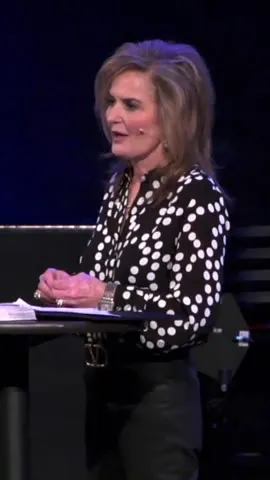
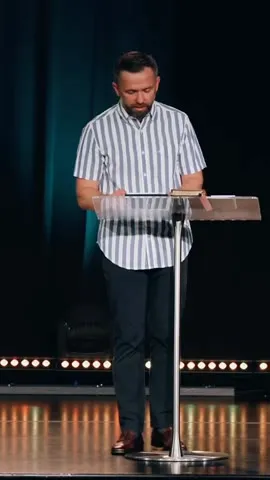
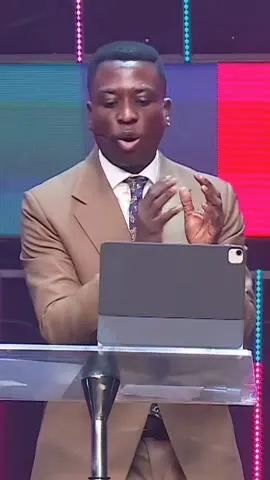

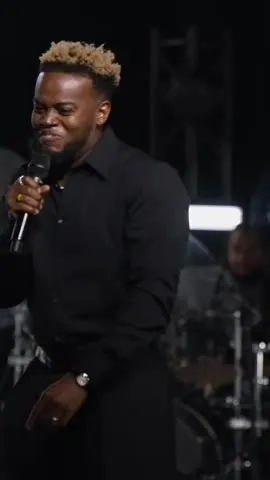
iaclips cut and captioned these clips from Creative Commons videos, credited on each one.
How long can a sermon clip be on each platform?
All three take vertical 9:16 video, which is what iaclips makes (1080 × 1920 pixels). The length limits differ:
- YouTube Shorts: up to 3 minutes (YouTube Help), so a Complete stories clip fits.
- Reels and TikTok: the same vertical clips work there, since they're 3 minutes or less.
Want shorter clips for a faster feed? Choose Shorter (up to 90 s) before processing.
Is there free sermon clip software?
iaclips has a free plan: 30 minutes on popular videos once at signup, with no credit card. On the free plan, only popular videos can use your remaining free minutes, and the video or chosen part must fit that balance, so mark just the sermon in From and To. Its clips carry a small watermark; there's none with a plan, or for 30 days after buying minutes while you still have bought minutes left ($6 an hour, no subscription). For several services a week, Creator is $12 a month for 150 minutes of video and Pro is $29 a month for 6 hours. Minutes are only used when a video gets clips.
What doesn't work well?
- Worship songs and music: iaclips picks moments from what's said, so it works with the sermon, testimonies and Bible studies, not with music.
- A livestream that is still live: wait until it has ended and YouTube shows it as a regular video.
- Private, members-only or age-restricted videos can't be downloaded from a link: upload the file instead.
- A stream longer than 4 hours: upload the file, or mark only the sermon from a shorter copy.
- Only use sermons you have the right to cut and post: your church's own, or someone else's with their permission.
Frequently asked questions
How do I make sermon clips for social media?
Take the finished livestream or the recording, mark where the sermon starts and ends, and cut it into vertical clips of one complete thought each, with captions. In iaclips you paste the link or upload the file, mark the sermon under From and To, and review the clips before you download them.
How long should a sermon clip be?
Long enough for one complete thought: often between 30 seconds and 3 minutes. YouTube Shorts takes up to 3 minutes. In iaclips, Complete stories clips run up to 3 minutes and Shorter clips up to 90 seconds.
Can I clip Sunday's livestream?
Yes, once it has ended and YouTube shows it as a regular video: paste that link. A link can be up to 4 hours long; if the stream ran longer, upload the file.
What if a clip cuts off a verse?
Move its start or end: in the clip's transcript, click Start here or End here on the right sentence. Only that clip is rendered again, in about 1 to 3 minutes.
What language will the clips be in?
The sermon's language: iaclips detects it, or you pick it from English, Spanish, Portuguese, French, German, Italian, Chinese, Japanese or Korean. The captions, title and post text come out in that language.
Sources
Checked November 2, 2026 on each platform's own help pages. The iaclips facts are the app's.
Keep reading
Try it with Sunday's sermon
Paste the livestream link or upload the recording. Free: 30 minutes on popular videos once at signup, no credit card. No watermark with a plan, or for 30 days after buying minutes while you still have bought minutes left.